Pages

Sunday, August 5, 2012

Watch Live Web Cams with simple Google Trick

Yes. We can watch Live webcams with a small Google trick I can say a simple Hack.
  1. Open Google.com
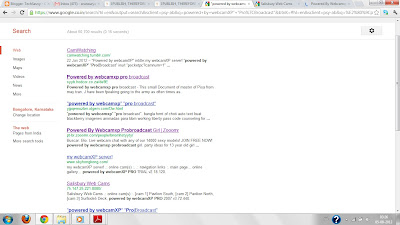
  2. Search for “powered by webcamXP” “Pro|Broadcast”
  3. It will return so many results but or interest is to find such links as below image 

    Salisbury Web Cams

    75.147.25.221:8080/            

    as shown below
Live WebCam


Open that link you can See public Live Cams 

How it will Work?

“Powered by WebcamXP” is a text found on specific kinds of webcam pages.
 google will search for that specific word returns corresponding results.

To Return Exact results you can search as below

inurl:“ViewerFrame?Mode=”

It will return more Exact results for Live Webcams.

Is this Legal?

Here we are not doing any hacking kind of things.
It is a simple Search query by google. 
It is individual responsibility to Secure their Web cams and especially Web sites.
They are not supposed to expose websites publicly.


Saturday, July 28, 2012

SlideShare.net : Online Slide Hosting Service

SlideShare is a Web 2.0 based slide hosting service. Users can upload files privately or publicly in the following file formats: PowerPoint, PDF,Keynote or OpenOffice presentations. 
Slide decks can then be viewed on the site itself, on hand held devices or embedded on other sites. Launched on October 4, 2006, the website is considered to be similar to YouTube, but for slideshows.
The website was originally meant to be used for businesses to share slides among employees more easily, but it has since expanded to also become a host of a large number of slides which are uploaded merely to entertain. Although the website is primarily a slide hosting service, it also supports documents, PDFs, videos and webinars. SlideShare also provides users the ability to rate, comment on, and share the uploaded content. The current list of SlideShare's investors includes Venrock, David Siminoff and Dev Khare.
The website gets an estimated 58 million unique visitors a month, and has about 16 million registered users.
SlideShare was voted amongst by the World's Top 10 tools for education & e-learning in 2010.
SlideShare's biggest competitors include Scribd.com, Issuu and Docstoc.
Some of the notable users of SlideShare include The White House, NASA, World Economic Forum, State of Utah, O'Reilly Media, Hewlett Packard and IBM.

And Apart from that we can find many slides they can be useful for Students for reading,professors for teaching. 


Slide Share

Monday, May 7, 2012

Ideone.com:Online Compiler for Programming Languages

Ideone.com
Your great Ideas born here..

What is ideone?
     Ideone is something more than a pastebin; it's an online compiler and debugging tool which allows to compile and run code online in more than 40 programming languages.


How to use ideone?
     Open Ideone.com Choose a programming language, enter your source code and input data into text boxes. Then check or uncheck run code(whether to execute your program) and private (whether not to list your code in the recent codes page) checkboxes, click the submit button and watch your snippet being executed. 
     
     This is the Most useful website for Programmers (Any Language) We can compile our code instantly.Our great Ideas born Here..

stackoverflow.com:Bible for Programers


    The StackOverflow.com communal question and answer site aims to be a repository for solutions to unusual or difficult programming issues.
     It is the result of a joint venture between Jeff Atwood, a well-known developer using Microsoft technologies and Joel Spolsky, CEO of Fog Creek, a small project management software company "intentionally designed to be pleasant". They approached Stack Overflow from a similar point of view.
     Rather than a central body or single expert setting the agenda, the site looks to pool the collective knowledge of individual developers.
     While this might "contribute to the increasing dumbenation of the world's developers" by propagating incorrect information, the belief is that the 'collective intelligence' of the group will be able to respond to individual issues much more effectively than a single entity.
      In this way, the site is similar to the free and collaboratively edited online encyclopaedia Wikipedia.org. The validity of the content may not be checked by an expert, but through the collaboration of the site's users, the best solution will become obvious.
     There are a huge number of forums and other web sites dedicated to discussing the spectrum of programming questions. Stack Overflow is one of the few programming related sites that attaches Creative Commons licences to it's content. It also stands out by combining a range of features usually kept separate, such as voting and collaborative editing.


Sunday, May 6, 2012

20thingsilearned.com:20 Things I Learned About Browsers and the Web


      How does the World Wide Web work?
      What is a browser? 
      What is Cloud Computing?
      What is HTML5?

      The Best Answers for the above questions is 20thingsilearned.com
      Google takes a stab at answering these questions and more with 20 Things I Learned, a Web application that gives the look and feel of a children's book. In a series of straightforward essays, the authors walk users through the basics of the modern Web, with an eye toward educating them about the benefits of using an up-to-date browser.
     The entire project is written in HTML5, the latest version of the language that helps structure and present the Web. Elegant animations and graceful transitions between pages give the Web app a charming, booklike feel - and they do it using open-source technologies that only recently came into use.

In one Line 
20thingsilearned.com is a Newbie's Guide to the World Wide Web 

Filehippo.com:Download Free Softwares

       To download software from the internet is a widespread practice for getting the best out of your computer.
       Filehippo.com provides a great database of useful programs in a safe environment free from spyware, pop-ups, invasive advertisements, and other nuances often present in similar websites.
        Filehippo claims that they offer the best software available, worrying about quality and not about quantity, which is a welcome feature also. With the exception of games (there are other specialized sites for that category), at Filehippo.com you will find a lot of software sections for every task a computer can do.
        Two main categories welcome the user at the top of the page: latest updates and most popular downloads. But the real treat will be to look at the following ones, were you will find web browsers and plug-ins, Anti malware programs, Audio and Video related software, as well as tools for file exchange, firewalls, Cd and Dvd applications, Office packages, file compressors, and many others.
        A free Update Checker will check all the software you have installed in your computer, and make a report of the programs which are not completely updated. Filehippo will then give you back a list of the available latest versions for your system. This tool works for every version of Windows since 98 to Windows 7.
        But at Filehippo.com, older versions are kept available also, so that if you don’t like the latest one you can go back to the one you prefer. Also, you can browse using a filter that will search only for free software or will leave out beta versions from search results.

In one line
Filehippo.com gives you the latest software for your computer, all in one place.

Saturday, May 5, 2012

Save datatable information into database

This Post will explain How we can save Datatable or Data Set information to Data base.
I tried to explain this in detail,but a primary knowledge on C#,Xml,Sql is required.

Steps as follows.
1.Save Data to a datatable
2.insert Datatable into a dataset
3.Convert the dataset into XmlString
4.Send this Xml string to a StoredProcedure Which will parse the Xml and Save the data into DataBase.

Creating a Table:

Create table Student{
Name varachar2(50),
Address varachar2(50),
Phone varachar2(50),
}

Data Table Creation And DataSet:

public static DataSet GetDataSetInfo()
{
    DataSet ds = new DataSet();
    DataTable dt = new DataTable("Sample");
    
    dt.Columns.Add("Name", Type.GetType("System.String"));
    dt.Columns.Add("Address", Type.GetType("System.String"));
    dt.Columns.Add("Phone", Type.GetType("System.String"));
    
    DataRow dr = dt.NewRow();
    dr["Name"] = "Srinivas";
    dr["Address"] = "Banglore";
    dr["Phone"] = "+91-9999912345";
    dt.Rows.Add(dr);
    
    dr = dt.NewRow();
    dr["Name"] = "Ravi";
    dr["Address"] = "Mumbai";
    dr["Phone    "] = "+91-9888894444";
    dt.Rows.Add(dr);
    
    ds.Tables.Add(dt);
    return ds    ;
}

Convert Dataset Into Xml String:

public static string DataSetToXMLString(DataTable dt)
{
    DataSet ds = new DataSet();
    string XMLformat;
    try
    {
        StringBuilder sb = new StringBuilder();
        StringWriter sw = new StringWriter(sb);
        ds.Merge(dt, true, MissingSchemaAction.AddWithKey);
        ds.Tables[0].TableName = "SampleTable";
        foreach (DataColumn column in ds.Tables[0].Columns)
        {
            column.ColumnMapping = MappingType.Attribute;
        }
        ds.WriteXml(sw, XmlWriteMode.WriteSchema);
        XMLformat = sb.ToString();
        return XMLformat;
    }
    catch (Exception Exception)
    {
        throw Exception;
    }
}

The Main Method:

static void Main(string[] args)
{
    DataSet ds = GetDataSet();
    String xmlData = DataSetToXMLString(ds.Tables[0]);
    SqlConnection conn = new SqlConnection
    ("Data Source=.;Initial Catalog=DBName;Integrated Security=SSPI;");
    SqlCommand command = new SqlCommand
    ("InsertData '" + xmlData + "'", conn);
     conn.Open();
     command.ExecuteNonQuery();
     conn.Close();
}

Stored Procedure:

This is very Important as it parses the xml String And Save into Database.

CREATE PROCEDURE InsertData (@xmlString VARCHAR(MAX))
AS
BEGIN
       DECLARE @xmlHandle INT 
       DECLARE @dummyTable TABLE 
  [Name] VARCHAR(50), 
  [Address] VARCHAR(50), 
  [Phone] VARCHAR(50)
        EXEC sp_xml_preparedocument @xmlHandle output, @xmlString  
INSERT INTO @dummyTable 
SELECT  [Name] ,[Address],[Phone]
FROM  OPENXML (@xmlHandle, '/NewDataSet/SampleDataTable',1) 
WITH ( [Name] varchar(50) '@Name', 
     [Address] varchar(50) '@Address', 
     [Phone] varchar(50) '@Phone'
   )
INSERT INTO SampleData ([Name],[Address], [Phone]) 
(SELECT [Name] ,[Address],[Phone]
FROM @dummyTable)
EXEC sp_xml_removedocument @xmlHandle
END

If you have any doubts feel free to contact me..